

FieldGuide is your key to uncovering a world of diverse plant species and wildlife. It’s your one stop shop for educational quizzes to prepare you for the great outdoors.
Study plants, animals, insects, and fungi through fun, educational quizzes.
Go outside. Know outside.
-
My Role
Platform & Tools
Project Timeline
Project Goals
-
The Problem Space
Secondary Research
Initial Assumptions
-
Research Methodology
User Interview Approach
Key Interview Insights
Interviewee 1: Background & Highlights
Interviewee 2: Background & Highlights
Interviewee 3: Background & Highlights
-
Affinity Mapping
Who Am I Designing For? (User Persona)
Experience Map
User Stories & Epics
Task Flow
How Might We Statement
-
Ideation Process
Inspiration & Design Considerations
Wireframe Development
UI Mockup Creation
-
Grayscale Prototype Development
User Testing Methodology
Testing Insights & Feedback
Design Iterations Based on Testing
-
Branding Development
Typography
Wordmark
Visual Identity
High-Fidelity Prototype
Marketing Website Concept
-
What I Learned
Future Improvements
Next Development Phases
What you’ll find in this case study
Or let me tell you about it here
Project Overview
My Role
Solo UX Designer
Researcher, Design Strategist, UX/UI Designer
Platform
IOS
Tools
Figma, Procreate
Project Length
10 weeks

Understand
Understand the Problem
Like many people, I dream of living in a little cottage in the woods, maybe next to a stream, perhaps on the edge of a mountain. I would spend my days reading and drawing, baking and sewing, and, of course, walking through the woods. I dream of knowing every plant I see. Its name, how common it is, it’s uses, etc.
I think of this whenever I do find myself out and about, passing by plants, trees, mushrooms, birds, and all the like. With life and all the hustle and bustle it brings, I don’t find time to read through my books on plants and animals, and even less time to work on actively remembering what I read, or better yet, going into the woods solely to ID everything I see with the help of a book or my phone.
Thus the idea for FieldGuide was born. Much like Duolingo, the aim of the app is to prepare its users for real life interactions, without the use of their phones. Through fun, interactive, educational quizzes, users can build their knowledge of plants, animals, insects, and fungi based on whatever region they’re interested in studying. Within various categories, nature enthusiasts can start with the basic, most common species that they might know already, or would most likely interact with on a regular basis, building their confidence as they learn to ID.
We are quickly losing more and more natural landscapes to human development, while also creating a further disconnection from understanding the ecosystems we dwell within. This leads to less of an understanding and appreciation for natural environments, which can result in:
more urban sprawl
a decrease in good mental health
increased loss of natural habitats for wildlife
increase greenhouse gases and climate change
more dependence on global food imports
The Problem Space
Research shows that a connection with nature improves mental health; we have become dependant on global imports, leading to a weakened circular economy; Canada’s natural landscape is quickly dissappearing in areas of human infrastructure and settlement.
Secondary Research


An estimated two-thirds of all produce consumed in Canada is imported.
Canada’s landscape consisting of settlement and human infrastructure went up by 11% from 2000 to 2015.

Mental health is improved by 92% when individuals engage with natural outdoor environments.
Assumptions
Individuals' lack of awareness affects their ability to understand environmental changes.
Enhancing awareness can motivate individuals to make sustainable choices.
Personal experiences and connections with nature improves peoples' quality of life and mental health.
People want to know more about the flora and fauna in their area.
Research

Research Methodology
Research Goals
Identify how nature enthusiasts currently learn to identify flora and fauna
Understand pain points in the plant/wildlife identification learning process
Discover what motivates people to learn about local ecosystems
Determine how users might incorporate a learning app into their nature routines
Research Methods & Rationale
User Interviews: Conducted semi-structured interviews with 3 participants to gain deep qualitative insights into their experiences, motivations, and frustrations when learning about nature identification
Secondary Research: Analyzed existing solutions including field guides, nature apps, and educational platforms to identify market gaps and best practices
Competitive Analysis: Evaluated similar learning apps (like Duolingo) to understand effective engagement mechanisms for educational content
Participant Recruitment
Selected participants with varying levels of nature knowledge:
Beginner nature enthusiasts who expressed interest but had limited knowledge
Intermediate users who occasionally use identification resources
More experienced nature lovers who actively seek to expand their knowledge
Participants must be adults aged 18 and above, from various backgrounds and occupations, residing in urban or suburban areas and have some regular outdoor interest
Interview Structure
30-45 minute sessions conducted remotely and in person
Questions focused on:
Current habits and resources for nature identification
Frustrations and challenges when trying to learn and remember species
Motivations for wanting to learn more about local flora and fauna
Technology usage patterns during outdoor activities
Learning preferences and styles
Interview Insights
-
Occupation: Digital Architect
Age: 34
Gender: Male
Location: Victoria, BC
-
Summary
In this interview, the interviewee shared his insights on his daily routines, outdoor activities, and his perspective on nature's role in his life. The participant expressed a curiosity about local plants and animals, the importance of knowledge about biodiversity, and how a deeper understanding could impact decision-making. He also highlighted challenges in finding reliable information and the value of accessible and engaging resources.
Highlights
Active in summer outdoor activities: swimming, sports, camping, hiking, and foraging.
Curious about plants and animals, uses apps and books for identification.
Nature provides anxiety relief, purpose, and a connection to the past.
Recognizes the importance of local plant and animal knowledge for ecological awareness.
Utilizes native plants for health and engages in invasive species removal.
Confident in identifying various species in their surroundings.
Faces challenges in accessing reliable information on local biodiversity and learning opportunities.
Believes deeper understanding enhances environmental appreciation and foraging experiences.
Values accessible, enjoyable, and engaging learning resources.
Open to learning through mobile apps, workshops, guided tours, and volunteering.
Motivated by a desire to fully embrace and understand outdoor environments.
Inspired by an impactful volunteering experience highlighting ecosystem importance
Insights
Prioritize accessible and engaging resources that align with an active lifestyle.
Emphasize the connection between knowledge, well-being, decision-making, and environmental awareness.
Consider easy access and entertainment value when designing resources.
Recognize the potential for outdoor experiences to drive motivation for learning.
Below are 3 user interviews with individuals who met the participant criteria. Included are each participants background, a summary of the interview, highlights, and insights.
-
Occupation: Communications Coordinator
Age: 29
Gender: Female
Location: Victoria, BC
-
Summary
In this interview, the interviewee discussed her daily routines, outdoor activities, and her profound connection with nature. The participant expressed a constant curiosity about plants and animals, emphasizing the role of nature in her well-being and the significance of understanding local biodiversity.
Highlights
Engages in daily outdoor routines, observing flora and fauna in her neighborhood.
Enjoys bird watching, hiking, and spending time with friends in natural settings.
Constantly curious about native plants and animals for their environmental and indigenous significance.
Nature profoundly impacts well-being, providing emotional connection and a sense of interconnectedness.
Knowledge of local biodiversity enhances appreciation for the environment and deepens nature connection.
Shares native plant knowledge during hikes, aiming to raise awareness and ecosystem protection.
Desires deeper understanding of plant and animal species.
Challenges in retaining extensive biodiversity information due to life's busyness.
Seeks stronger connection with land and increased happiness through comprehensive nature understanding.
Values resource aiding memory retention during outdoor activities.
Prefers practical resource features: common and indigenous names, species history, and visuals.
Favors mobile apps and guided tours for accessible and immersive learning.
Motivated to deepen nature connection, share knowledge, and learn about indigenous culture.
Emphasizes respect, curiosity, openness, and connection with the world in nature relationship.
Summary
Regular nature engagement bolsters well-being and interconnectedness.
Knowledge of native biodiversity enriches environmental understanding and cultural appreciation.
Practical resources suited for outdoor routines are crucial.
Desire to deepen nature bond, share knowledge, and engage with indigenous culture fuels motivation.
-
Occupation: Lead Software Developer
Age: 29
Gender: Female
Location: Victoria, BC
-
Summary
The interviewee discussed her daily routines, outdoor activities, and thoughts on connecting with nature. She highlighted her changing perspective on nature due to impending parenthood and described the uplifting effect of being outdoors on her well-being.
Highlights
Engages in daily outdoor routines, spending around an hour outside each day.
Enjoys various outdoor activities, including hiking and picnicking.
Curious about plants and animals due to impending parenthood and desire to teach her children.
Nature plays a vital role in well-being, positively impacting mood.
Considers knowledge of local biodiversity enjoyable, especially for community engagement.
Not encountered instances where biodiversity knowledge influenced decisions.
Lacks confidence in identifying species, can identify deer and roses.
Challenges in learning due to lack of fundamental knowledge.
Deeper understanding of local flora and fauna would enhance outdoor experiences.
Values easy, fun resource promoting learning accountability.
Envisions resource with history tracking, quick access, social aspects, and achievement features.
Prefers indirect engagement through photography, with later summaries.
Motivated by impending parenthood, nature-interested friends, and distinct environments.
Would rather not spend time on her phone when in nature.
Edit
Insights
Impending parenthood drives renewed interest in nature.
Convenience, enjoyment, and accountability are key factors for resource engagement.
Capturing observations for later summaries aligns with preferred engagement mode.
Key Patterns & Themes Across Interviews
After analyzing all three interviews, several significant patterns emerged that inform our understanding of how users connect with and learn about nature:
Motivations for Learning Nature Identification
Personal Well-being: 100% of participants mentioned nature's positive impact on their emotional health and well-being
Knowledge Sharing: 67% expressed desire to share nature knowledge with others (friends during hikes, teaching children)
Cultural Connection: 33% specifically mentioned interest in indigenous knowledge and naming of plants
Changing Life Circumstances: 33% noted how life changes (like parenthood) created new motivation for nature learning
Current Learning Approaches
Casual Observation: 100% engage in daily or regular outdoor observation as part of their learning
Varying Confidence Levels: Clear progression from high confidence (Interviewee 01 who forages) to low confidence (Interviewee 03 who can identify only deer and roses)
Existing Tool Usage: 67% mentioned using some form of identification tools (apps, books)
Pain Points & Challenges
Knowledge Retention: 100% expressed difficulty remembering species information over time
Time Constraints: 67% mentioned "life's busyness" as a barrier to deeper learning
Lack of Foundational Knowledge: 33% highlighted that not having basic knowledge makes further learning difficult
Technology Distraction: 33% specifically noted preference not to use phones when in nature
Desired Features in Learning Resources
Enjoyment Factor: 100% emphasized the importance of learning being "fun" or "enjoyable"
Visual Components: 67% indicated preference for visual learning aids
Cultural Context: 67% expressed interest in historical or indigenous information about species
Progressive Learning: 100% wanted resources that build knowledge over time in an accessible way
Social Elements: 33% mentioned interest in community or social aspects of learning
Impact of Deeper Nature Knowledge
Enhanced Experience: 100% believed deeper understanding would enhance their outdoor experiences
Environmental Awareness: 67% connected biodiversity knowledge with better environmental stewardship
Community Connection: 67% saw nature knowledge as a way to connect with others or their community
Analyze

Affinity Mapping
Through Affinity Mapping I was able to establish the interviewees goals, motivations, pain points, and behaviours. I then synthesized these findings into two main themes:

Theme 1: Desire for Knowledge of Nature
Users seek to bridge the gap between their curiosity about nature and the challenge of identifying local plants and animals. They want accessible and engaging resources to deepen their understanding and appreciation of the environment.
Theme 1 Insights

Theme 2: Deepening Nature Connection
A strong desire exists among users to nurture a deeper connection with nature, driven by the uplifting effect of outdoor experiences. They aim to share this connection with others and infuse nature into their daily lives.
Theme 2 Insights
Who am I designing for?
Based on the User Interviews, I developed Emily. She is a modern woman, but someone who enjoys slowing down and taking in the world around her. She is ambitious and hungry for knowledge, always aiming to deepen her understanding and gain insights into the biodiversity that surrounds her.

Experience Mapping
Currently Emily must either rely on her previous knowledge from personal research, or bring out her phone to ID, when she’s looking for a disconnection from technology, as someone who works from a computer all day long and relies on it for most other aspects of her life.

User Stories & Epics
This app is all about connecting nature enthusiasts to their local environment. These user stories and epics outline how the app helps users learn about plants and animals while they're out enjoying nature.
I want to make learning fun and distraction-free, so users can focus on the world around them. These stories cover everything from creating quizzes to tracking progress and earning rewards.
My goal is to help users become more knowledgeable and engaged with their natural surroundings.
-
As a nature enthusiast, I want to create custom quizzes by selecting specific plants and animals I want to learn about, so that I can focus on what interests me the most.
As a nature enthusiast, I want to browse and use pre-made quizzes created by experts or the community, so that I can learn from a variety of sources.
As a nature enthusiast, I want to set quiz preferences like the number of questions and quiz duration, so that I can tailor my learning experience to match my pace.
-
As a nature enthusiast, I want to start a quiz and receive questions about the species in my chosen quiz, so that I can test my knowledge.
As a nature enthusiast, I want to receive immediate feedback on my quiz answers, including correct answers and explanations, so that I can learn from my mistakes.
As a nature enthusiast, I want the option to pause and resume quizzes, so that I can fit learning into my schedule.
-
As a nature enthusiast, I want the app to keep track of my quiz performance and show my progress over time, so that I can see how my knowledge improves.
As a nature enthusiast, I want to review my quiz results, including questions I answered incorrectly, so that I can reinforce my learning.
-
As a nature enthusiast, I want to earn badges or achievements for completing quizzes or achieving certain milestones, so that I can stay motivated and engaged in learning.
-
As a nature enthusiast, I want to access my saved quizzes and continue learning even without an internet connection, so that I can learn about local flora and fauna in remote areas.
Expanded Epic
The heart of this nature exploration app lies in the engaging and informative quiz-taking experience.
Through this core epic, users will immerse themselves in an interactive and educational journey that fosters a deeper connection with the natural world.
The quiz-taking functionality is designed to make learning about plants, animals, and ecosystems not only fun but also accessible.
Let's explore the key features and user stories that make up this enriching epic.
-
User Story:
As a nature enthusiast, I want to start a quiz easily so that I can quickly test my knowledge while I'm out in nature.
Acceptance Criteria:
The app's home screen prominently displays an option to start a quiz.
Users can tap this option to begin a quiz immediately.
-
User Story:
As a user taking a quiz, I want clear and concise questions so that I can understand them easily.
Acceptance Criteria:
Quiz questions are presented one at a time, with a clear, legible font.
Each question is accompanied by a high-quality image or audio recording related to the topic.
Questions are written in plain language, avoiding jargon.
-
User Story:
As a quiz taker, I want to see multiple-choice answers for each question so that I can select the correct one.
Acceptance Criteria:
Each quiz question is followed by a set of multiple-choice answers.
Users can tap the correct answer to proceed to the next question.
Tapping an incorrect answer provides feedback and the opportunity to try again.
-
User Story:
As a user, I want a time limit for each quiz question so that I can challenge myself and stay engaged.
Acceptance Criteria:
The app imposes a reasonable time limit for each quiz question (e.g., 30 seconds).
A countdown timer is prominently displayed during each question.
If the user exceeds the time limit, the app automatically moves to the next question.
-
User Story:
As a nature enthusiast, I want the option to skip a question if I'm unsure, so that I can keep the quiz flowing.
Acceptance Criteria:
Users can tap a "Skip" button if they choose not to answer a question.
Skipping a question does not penalize the user.
Users can revisit skipped questions later if they wish.
-
User Story:
As a quiz taker, I want instant feedback on my answers so that I can learn from my mistakes.
Acceptance Criteria:
After answering a question, the app provides immediate feedback on whether the answer was correct or incorrect.
If the answer is incorrect, the app briefly explains the correct answer.
Users have the option to review their quiz results after completing the quiz.
-
User Story:
As a user taking a quiz, I want the option to save my progress and resume later, in case I can't finish the quiz in one go.
Acceptance Criteria:
During a quiz, users can tap a "Save Progress" button.
Saved quizzes are accessible from the app's main menu under "Saved Quizzes."
Users can resume a saved quiz at any time.
-
User Story:
As a quiz taker, I want a variety of quiz topics and difficulty levels to choose from so that I can tailor my learning experience.
Acceptance Criteria:
The app offers a diverse selection of quiz topics, such as plant identification, animal facts, and ecology.
Users can filter quizzes by difficulty level, ranging from beginner to expert.
Users can also browse quizzes by popularity or recent additions.
-
User Story:
As a nature enthusiast, I want the option to compete with friends in quiz challenges to make learning more engaging and fun.
Acceptance Criteria:
The app allows users to create and join quiz challenges with friends.
Challenges have a specified time limit, and participants aim to answer as many questions as possible.
Leaderboards display the top participants in each challenge.
-
User Story:
As a quiz taker, I want the option to review my quiz history and see my progress over time so that I can track my improvement.
Acceptance Criteria:
The app maintains a history of completed quizzes for each user.
Users can access a "Quiz History" section to view past quizzes, scores, and detailed results.
The app provides visual representations of progress, such as graphs showing quiz scores over time.
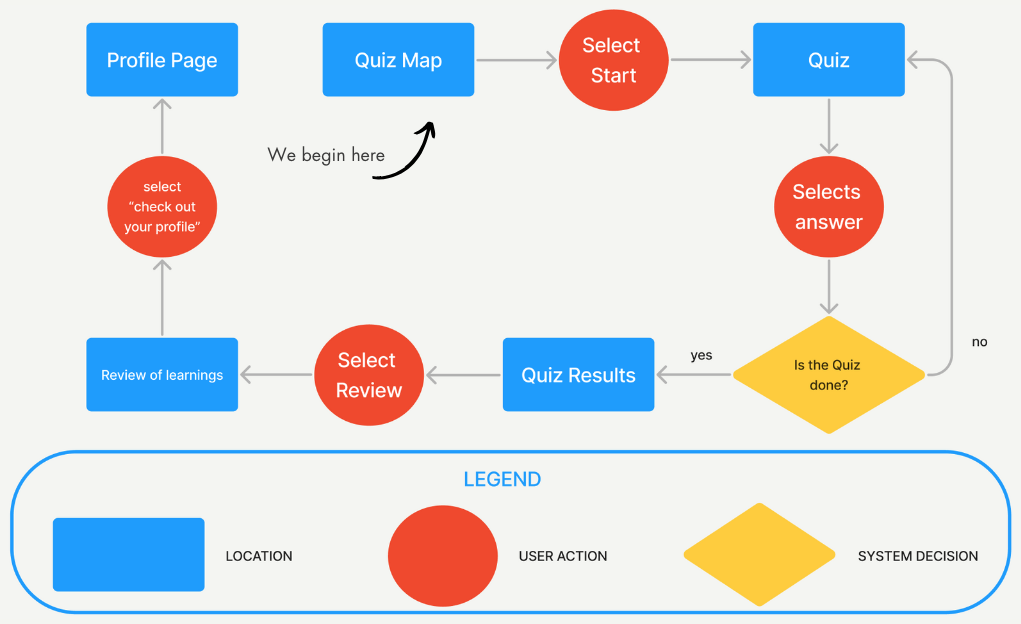
Welcome to the app's Quiz Taking task flow. This journey guides users in exploring nature through quizzes. The app caters to nature enthusiasts of all levels, offering engaging quizzes on various topics. In the Task Flow, you’ll go through the steps, starting from the home screen, to the quiz, to reviewing the results. The User’s goal is to complete a quiz on Edible Plants and to view their final results.
Task Flow
How Might We…
How might we develop an intuitive and enjoyable platform that helps users effortlessly identify and learn about local plants and animals, addressing the challenges of information scarcity and identification, and sparking their curiosity and connection with the natural world?
Sketch
I began looking for inspiration for the design and layout of the the app. I took elements from other quizzing apps, various vintage style UIs I came across, and even old library catalogues.
I wanted to give the user the feeling of being a botanist or zoologist in a time of new discovery, and transport them to another era, where these plants and animals are just being newly uncovered, and understanding them is important work.
Ideation Process


Inspiration for the design of this app comes from vintage “Field Notes” notebooks and old library card catalogues.
I aimed to incorporate a simple, clean line design, with an old-time feel, with the file folder motif throughout the app.
Inspiration & Design Considerations

I’m took UI inspiration from other designs that align with this vintage feel.

The original inspiration for this app is Duolingo, with an education focus, driving the user to come back and learn every day, through quizzes and more. So, I looked at other quiz/education UIs, as well.

Based on my inspiration research, I began sketching my lo-fi wireframes. Here you’ll see the beginning stages of what the final screens would eventually become.
Wireframe Development
Though the tab style for the different pages was hard to nail down on paper, I went ahead and used that motif in the final designs.
UI Mockup Creation

And these were the final designs I went with and what I based my final mockups on, as you’ll see in the following section.
Prototype, Test, Iterate


Grayscale Prototype
-
![]()
Tutorial Start
The app opens with the option for a tutorial walk-through.
-
![]()
Explore
This is landing page. Each stepping stone is a level to complete, while the unit, section, region, and type of species being studies is visible at the top of the tab.
-
![]()
Friends
Exploring the tabs at the top of the screen, you’ll find the friends section. Here you can connect with others, encourage each other, and create competitive gamification, if users wish.
-
![]()
Profile
The Profile section house your personal stats, streak, points, following and follower, along with all your achievements.
-
![]()
Quiz 1.1
This is a simplified view of what a quiz might look like. I bet you’ll get this one right!
-
![]()
Quiz 1.3
Here is another view of what a quiz might look like, this time text based.


For the grayscale prototype phase, I conducted moderated usability testing sessions with 5 participants to gather feedback on the initial design direction and identify usability issues early in the development process.
Testing Approach
Participants: 5 individuals with varying levels of nature knowledge and app experience
Format: One-on-one moderated sessions lasting approximately 20-30 minutes each
Testing Environment: Remote sessions using screen sharing to observe interactions
Testing Goals
Evaluate the intuitiveness of the app's navigation and information architecture
Assess the clarity of instructions and onboarding process
Identify any usability obstacles or points of confusion
Gather feedback on the quiz format and learning progression
Testing Protocol
Brief introduction to the project concept without revealing specific design intentions
Task-based scenarios asking participants to complete key user journeys
Think-aloud protocol where participants verbalized their thoughts while navigating
Post-test interview questions to gather overall impressions and suggestions
User Testing Methodology
-
There was some confusion about why they were doing what they were doing - could be clearer in instruction and have an on-boarding/instruction page
Found the top tab system to be cramped, would benefit from having an intro to the quiz page
-
Found the indexed and new species confusing
Would like to see indigenous name
Confusion over the point of the app. Can you ID by taking pictures
Really liked the idea of the hike challenges
-
Confusion around quiz part 03, order of the paragraph and “select the correct statement” needs to be reevaluated
Confusion over the index having the same plant twice
Would expect to see the settings in the profile tab
Could be cool to be able to arrange the index in different formations (alphabetical, order of discovery, etc)
Would like to know why salal was chosen to learn
Should add other photos for the multiple choice quiz
-
Confused by why there’s two of the same plant in index
Unclear why I would follow someone
exploring a new species box at the bottom that feels wrong
Should change the tree illustrations
Tabs too jumbled/hard to see
The path looks like it should start from the bottom
Wants to feel like correct answers are a bigger deal
Should be as many dots at the top as there are questions
“I wonder how it would look with lots of species. How to organise, or endless scroll.”
like that you have three easy words to remember plant by
# of things you've indexed should be part of your stats.
under achievements should be things you've achieved
-
Pokemon, but for plants
“Makes me want to increase my list”
noticed in the explorer the heading changed.
Pics next to the field guide in the top but not in the other heading.
Negative thing: inconsistent capitalization.
I conducted User Testing with 5 different individuals. Each gave invaluable feedback, of which I was able to implement most of. Look below to see their insights.
Testing Insights & Feedback
Design Iterations Based on Feedback
Notes and initial thoughts post-testing
Create a more cohesive high-fidelity components library
Nail down the style I’m going for
Write down all features I’d like to incorporate into the app
Finding a way to make the app have a vintage feel, without it being “dated”
V01 - V02 Changes
EXPLORE PAGE
Changed forest imagery
Switched the starting point from the top to the bottom
Eliminated the “Explore New Species” button

QUIZ PAGES
Changed from 5 to 3 progress dots up top
Changed the instructions on quiz 03
Changed “correct!” to “CORRECT!”
Changed “continue” to “CONTINUE”
Added a “3” into the hearts, to suggest 3 lives/tries left
Added dark outlines around correct answers on quiz 03
Added “CORRECT!” to quiz 0

OVERALL
Added an App tutorial to begin with
Added a Friends Page
Added ability to swipe between tabs

Round 02 Tester Feedback
Round 2 testing came with very little feedback:
No capitalization of unit in tutorial
Change from click to tap in tutorial
Still haven't added flower and bird
“I’m already taking a quiz, I would've liked a little intro.”
Branding is where I really wanted Field Guide to stand out. I wanted to bring a vintage feel, playing with the concept of library catalogue cards and file folder systems that modern systems still use, but paying homage to feel of hardcopy.
Branding Development
Final Design
Typography
I wanted to carry on the Futura font from the Field Notes notebooks and pair it with a more vintage feeling typeface, so landed on Red Hat Mono, which reminded me of a typewrite and looks a lot like the typeface one would find on old library catalogue cards.

Wordmark
I was inspired by icons of national parks, outdoors brands, and books.


My initial drawings followed my inspiration quite closely.
I then decided to start playing around on the computer, as I knew that the simple “Field Guide” in Futura was going to be the basis of my wordmark.
I started playing around with adding little outdoorsy icons.
I eventually landed on the branch and butterfly.
I decided to enlarge the butterfly and move it to the second “D” to spread out the imagery within the lettering.


And this is my final wordmark in black and white.

I liked the imagery in the wordmark, so decided to just make a simple, slightly modified version for the icon
I played around with colour and the placement of the butterfly.

In the end, this is where I landed for the icon and wordmark. I like the vintage and natural feel of the forest green and warm, yellowy tan, reminiscent of old paper or notebooks. The colouring and imagery give a feel for what can be expected inside the app without even having to read a description.
High-Fidelity Prototype
In this final app iteration, I've invested countless hours in trials, testing, and refinement. Every element was meticulously chosen. But this is just the start. I'm excited to witness FieldGuide's ongoing evolution.
For now, I take pride in the work I’ve accomplished and am thrilled to present this latest version of FieldGuide.

-
![]()
Splash Screen
-
![]()
Tutorial Start
-
![]()
Explore
-
![]()
Profile
-
![]()
Friends
-
![]()
Quiz 1.1


Marketing Website
Check out the FieldGuide Marketing website.
Available on Desktop and Mobile!

What Did I learn?
Though this is just the beginning of FieldGuide’s journey into being, I’m proud of these humble beginnings. I’ve learned an incredible amount and still feel there is so much more I can do and look forward to exploring what this app idea and I are capable of!
Some of my key take aways from this adventure have been:
don’t throw things out.
make copies of files for new versions
get the basics up and deal with the small details later
it’s easier to edit overall pieces if they’re a component’s iterant
go over everything first and make a plan
explore every option
don’t stop on the first idea, even if it’s what you end up using
Next Steps
I truly believe that FieldGuide is something that could be of great use to many people. Not only to connect them with nature, but with themselves and their community.
The next steps in this journey are:
do more user testing and feedback
further refine existing features
expand the content and features
prioritize making the design more accessible
work with developers to begin building
address any legal aspects
continue to develop a long term vision
explore revenue options (ads, subscription, etc.)

Contact me.
keiroblyth@gmail.com
Victoria, BC, Canada